Changer
Changes the visual style of the match — chat emoticons, weather, river water and tree models — and lets you equip any cosmetic item on your hero.
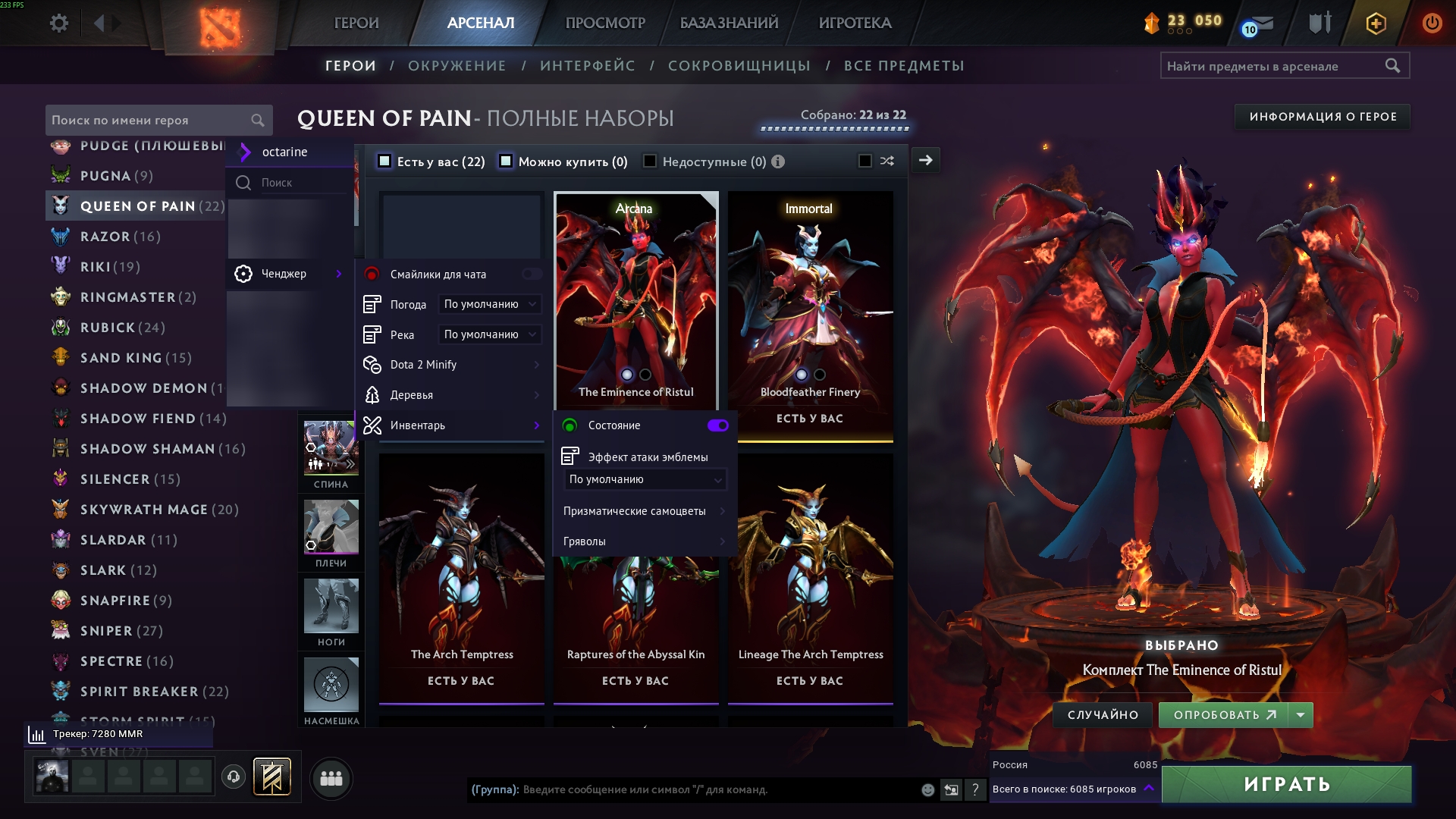
Location in the menu
octarine → Changer
What it does
Changer swaps parts of Dota 2's visual style for options you choose and lets you customize your hero's appearance. Simple toggles and dropdowns are configured right in the menu, while the larger blocks live in their own submenus (Dota 2 Minify, Trees, Inventory).
| Menu item | Type | Description |
|---|---|---|
| Chat emoticons | Toggle | Enables custom chat emoticons. |
| Weather | Dropdown | Changes the weather on the map (e.g. Snow). Default — Default. |
| River | Dropdown | Changes the appearance of the river water (e.g. Slime). Default — Default. |
| Dota 2 Minify | Submenu | A set of mods that simplify visual and sound effects for better visibility and performance. See Dota 2 Minify. |
| Trees | Submenu | Replaces tree models and their size (see below). |
| Inventory | Submenu | The inventory changer — lets you equip any cosmetic item on your hero (sets, arcanas, immortals, etc.). See Inventory. |
tip
Every dropdown has a Default option — pick it to revert that single setting to its standard value.
Trees
Changer → Trees
| Menu item | Type | Default | Description |
|---|---|---|---|
| Tree models | Dropdown | Default | Replaces the model of all trees on the map. Available: Default, Simple Cube, Minecraft Cube, Pumpkins#1, Pumpkins#2, Immortal Gardens. |
| Size | Slider | 1.0 | Scale of the tree models. |
Submenus
- Dota 2 Minify — mods that remove and simplify visual and sound effects for better visibility and performance.
- Inventory — the inventory changer: lets you equip any cosmetic item in Dota on your hero (sets, arcanas, immortals, etc.).