Overwolf
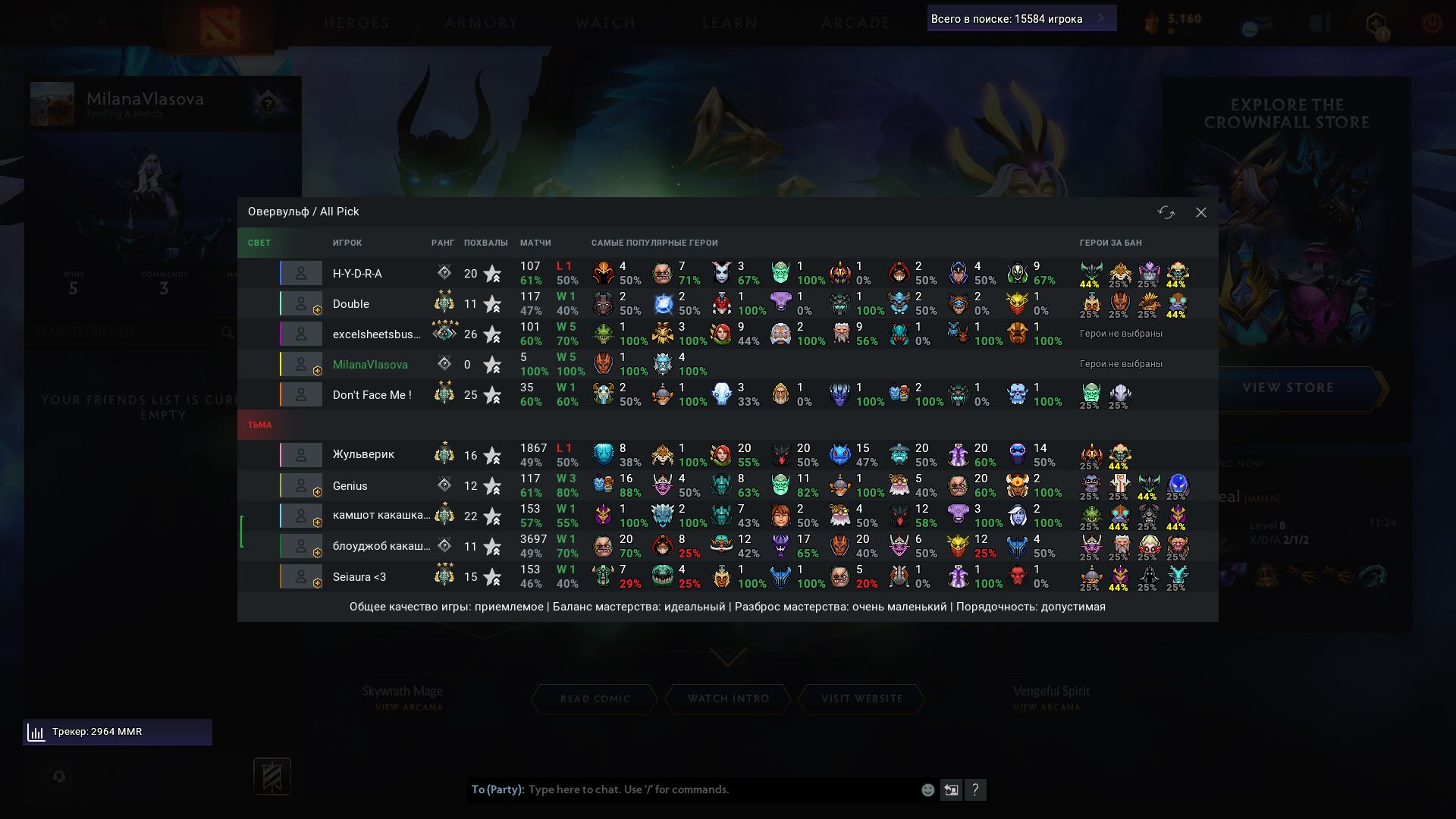
An in-game panel with stats for every player in the lobby: rank, number of matches, win rate, streak and most-played heroes.
Location in the menu
Overwolf (Овервульф)
What it does
The script automatically gathers stats for everyone in the current lobby and displays them as a table on screen. The panel appears when you enter a lobby and is shown/hidden with a hotkey or by clicking the analytics icon at the top of the screen.
Data is loaded in parallel for all players (up to 16 simultaneous requests). While loading, an animated placeholder with a loading percentage is shown in the most-played heroes column.
Panel layout
The table is split into two blocks — Radiant and Dire. The following columns are shown for each player:
- Role — the icon and number of the chosen position (1–5), if the player set a role in the lobby.
- Hero — the player's color bar + the portrait of the chosen hero. A subscription badge is shown for Dota Plus subscribers. Hovering over the hero shows a tooltip with stats for that hero.
- Player — the nickname. Your own nickname is highlighted green, muted players red, spectators blue. Nicknames longer than 12 characters are truncated with "…". Hovering shows a tooltip with the player's last-match data.
- Rank — the medal icon and number of stars.
- Matches — the total number of matches and overall win rate (on the left), plus the streak and win rate for recent games (on the right). The win-rate color changes depending on the value.
- Most-played heroes — up to 8 heroes, sorted by the date of the last match. For each one: portrait, number of matches and win rate. Hovering shows a tooltip with detailed stats (total and recent wins/losses).
Panel header
The header shows: the "Overwolf" title, the lobby type (Lobby / Ranked / Battle Cup) and game mode (All Pick, Turbo, Captains Mode, etc.), as well as the MatchID of the current game. Buttons in the top-right corner: close the panel and force-refresh the stats.
Panel footer
At the bottom of the table the match quality from the lobby data is shown: overall quality, skill balance, skill spread and behavior — with text ratings ranging from "questionable" to "perfect".
When the panel is unavailable
If the script could not load a player's stats, a message asking you to restart the loader is shown in the "Matches" column. The panel does not open if there is only one participant in the lobby.
Settings
Main
| Menu item | Type | Default | Description |
|---|---|---|---|
| State | Toggle | On | Enables/disables the entire script. When disabled, the panel is not shown and stats are not loaded. |
Hotkeys
| Menu item | Type | Default | Description |
|---|---|---|---|
| Panel | Hotkey | Not set | Show/hide the stats panel. Also works inside the scripts menu. |
| Reload stats | Hotkey | Not set | Force-reload the stats for all players in the lobby. Also works inside the scripts menu. |